Making FRC Robot Code Easier in Kotlin
A Kotlin DSL for WPILib commands, plus units, logging, tunables, and robot setup that make FRC robot code easier to read and write
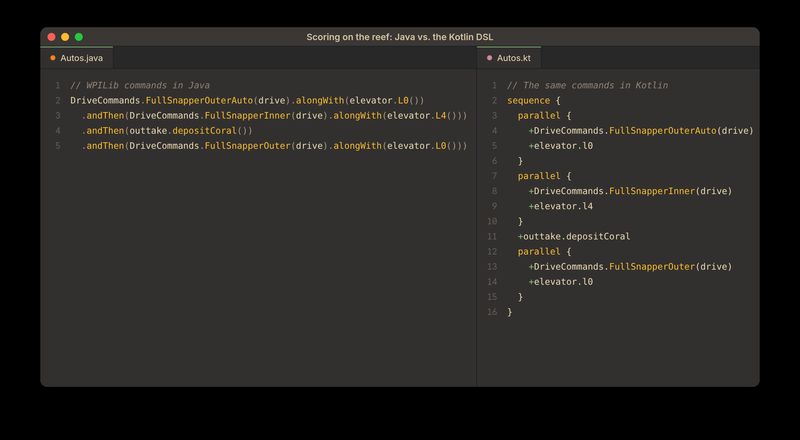
Table of Contents
Syntax is a powerful thing for developer experience. JSX didn’t let browsers do anything new, but it made UI code clear and declarative, and it changed how a whole community writes the web. I’ve always thought FRC robot code could use the same treatment. This post is about a Kotlin DSL I built on top of WPILib’s commands so they read like what the robot actually does.
Here’s a real sequence from our 2025 competition robot (FRC’s Reefscape season). The robot drives to the reef while lowering its elevator, drives in while raising it to the top level, scores, then backs out while lowering again:
DriveCommands.FullSnapperOuterAuto(drive).alongWith(elevator.L0())
  .andThen(DriveCommands.FullSnapperInner(drive).alongWith(elevator.L4()))
  .andThen(outtake.depositCoral())
  .andThen(DriveCommands.FullSnapperOuter(drive).alongWith(elevator.L0()))
And the same thing with the Kotlin DSL:
sequence {
  parallel {
    +DriveCommands.FullSnapperOuterAuto(drive)
    +elevator.l0
  }
  parallel {
    +DriveCommands.FullSnapperInner(drive)
    +elevator.l4
  }
  +outtake.depositCoral
  parallel {
    +DriveCommands.FullSnapperOuter(drive)
    +elevator.l0
  }
}
The Kotlin version isn’t shorter; it’s four times as many lines. What it buys is shape. You can see at a glance that there are four steps, that three of them do two things at once, and which two things. In the Java version you have to parse the chain to find out, and it’s easy to misread which .alongWith() belongs to which .andThen().
That’s the whole idea behind this project: build the same declarative tree of commands WPILib already uses, but write it so it reads like the imperative code students already know.
Commands are where I started, but the library has grown to cover other places Java gets in the way: units, logging, tunable constants, subsystem access, and the robot’s setup code. Those come after the DSL, in the rest of the library.
Why this matters to me
I’ve been part of FIRST Robotics as a student, as a student mentor, and now as an adult mentor for FRC team 2220. I’ve seen the challenge of teaching coding to students from all of those angles, and I’ve always thought we could do more within FIRST to make coding accessible to students who have trouble getting over the initial learning curve. Usually what stops them isn’t robotics, and it isn’t really programming. It’s the abstractions between them and the robot.
FRC teams program their robots with WPILib, a Java (and C++ and Python) framework for the robot’s controller. There are two common ways to structure that code:
| Strengths | Weaknesses | |
|---|---|---|
| Loop-based: one big loop that reads sensors and sets motors every 20 ms | Easy to follow, easy to debug, and the same shape as most embedded code | Hard to structure as the robot grows, hard to split between students, and nothing stops two pieces of code from fighting over one motor |
| Command-based: small commands that each claim some subsystems, composed into bigger behaviors and run by a scheduler | Modular, composable, and it teaches real software design | Abstract, verbose, and a steep learning curve that doesn’t carry over outside FRC |
Our robots are complex and our software team is large, so 2220 has used command-based for years. Paired with mentors who push good idioms, it develops students who are comfortable working in a shared codebase and skilled at teamwork, which is a big part of being a good software engineer. But its costs land hardest on the students we most want to keep: new programmers, and students who know basic imperative programming but haven’t seen a lambda or a fluent API before. Composing commands is where they get stuck.
Here’s a smaller example: an elevator command that lowers to its minimum height, waits to get there and hit the limit switch, then cuts power.
this.runOnce(() -> {
    desiredLevel = Level.minHeight;
    Angle r = inchesToRadians(desiredLevel.getHeight());
    io.setWinchPosition(r);
  })
  .andThen(Commands.waitUntil(isAtGoal()))
  .andThen(Commands.waitUntil(lowerLimitHit))
  .andThen(this.runOnce(() -> {
    io.setWinchOpenLoop(Volts.of(0));
  }))
  .withName("Elevator.minHeight");
A new student has to learn lambdas, method chaining, the Commands factory methods, and why this.runOnce is different from Commands.runOnce, all before they get to the part about the elevator. The same command in the DSL:
sequence {
  run(this@Elevator) {
    desiredLevel = Level.minHeight
    val r = inchesToRadians(desiredLevel.getHeight())
    io.setWinchPosition(r)
  }
  wait(isAtGoal())
  wait(lowerLimitHit)
  run(this@Elevator) {
    io.setWinchOpenLoop(Volts.of(0))
  }
}.withName("Elevator.minHeight")
Braces and indentation show structure and order. There are fewer concepts to learn before you’re productive, and no lambda syntax to trip over. And the sequence block runs top to bottom, with wait pausing before the next line, which is exactly how students already expect code to behave.
Why Kotlin
When you’re teaching, there’s a balance to strike between explicit and implicit. Java is explicit: you tell it exactly what to do and it does it, which is a problem when you don’t yet know how to say what you want. Python is more implicit, and students get up and running with fewer roadblocks. Kotlin sits in between.
It also keeps what matters about Java in FRC, whose ecosystem is enormous. Kotlin runs on the JVM and calls Java libraries directly, so vendor libraries, WPILib itself, and years of team code keep working, and the volunteers who help debug robots at events still recognize what they’re looking at.
My goal is that switching to Kotlin gets students up and running faster, spending less time learning syntax and less brain power digesting Java’s verbosity.
The plan was to switch 2220’s robot code to Kotlin for the 2026 season. It was deferred because FRC’s control hardware is changing: the roboRIO is being replaced by a new controller that Limelight is helping build, and adapting to that has been this offseason’s focus. Everything in this post has been built and run heavily in simulation, but none of it has driven a robot at an event yet.
The command framework and scheduler is a robust and well-tested system, and I didn’t want to replace it. So instead of a new framework, I built a DSL on top of it with Kotlin’s type-safe builders.
A tour of the DSL
Blocks and +
There are four block types, sequence, parallel, race and repeat(times), plus two helpers that take blocks: ifElse(condition, { ... }, { ... }) and wait(timeOrCondition) { thenDoThis }. Inside a block, calling one of the DSL’s own functions (run, wait, print, or a nested block) adds that command for you.
A command you built somewhere else, like elevator.l4, is just a value, and a value sitting alone on a line in a Kotlin lambda doesn’t go anywhere. The + is how you say “this one belongs in the block too.” It’s the same convention kotlinx.html uses, where +"text" adds a text node to the element you’re inside. When I surveyed students, they didn’t mind the +. What they noticed was how much less there was to write. Of the 12 I asked, 8 preferred the DSL, 3 were neutral, and 1 preferred Java.
Inline style
Short compositions don’t need a block. The DSL keeps an inline style using Kotlin infix functions:
wait(1.0) then print { "one second later" }
DriveCommands.FullSnapperInner(drive) with elevator.l4 timeout 4.0
repeat { print { "tick" }; wait(0.5) } onlyWhile { DriverStation.isEnabled() }
The two styles mix freely, and every result is a normal WPILib Command, so DSL commands and Java-built commands can be combined in either direction.
Scoped timers
Because each block is an object at runtime, it can carry state that belongs to that block and nothing else. The most useful one is time. Every block records when it started, and elapsed is a Kotlin delegated property that reads the time since then:
sequence {
  // startTime is provided by the sequence in this scope
  print { "outer started at $startTime sec" }

  val outerElapsed by elapsed
  repeat {
    print { "time since outer block started: $outerElapsed sec" }
    wait(0.5)
  } timeout 3.0

  sequence {
    // elapsed is scoped to this block, so innerElapsed is how long this sequence has been running
    val innerElapsed by elapsed
    print { "inner started at $startTime sec" }
    wait(3.0)
    print { "time since inner block started: $innerElapsed sec" }
    print { "time since outer block started: $outerElapsed sec" }
  }

  print { "all done!" }
}
On a robot, that becomes rules like “give up on intaking if this step has run for two seconds without a game piece,” written right where the step is:
sequence {
  +DriveCommands.SourceSnapper(Drive.it)
  sequence {
    val intaking by elapsed
    +Outtake.it.autoQueueCoral3() until { Outtake.it.seesAtOutputTrigger.asBoolean || intaking > 2.0 }
  }
  +Elevator.it.L0()
}
Doing this with plain WPILib means a field or a captured array holding a timestamp, a runOnce to set it at the right moment, and remembering which timestamp belongs to which group. Here the nesting of the code is the nesting of the timers.
How it works
The whole DSL is a single Kotlin file of about 450 lines, and it sits entirely on top of WPILib. Every block builds a normal command out of Commands.sequence, Commands.parallel, Commands.race and friends, so the scheduler, requirements and interruption behave exactly as they always have.
The core is Kotlin’s type-safe builder pattern: a function that takes a lambda with a receiver. Inside the lambda, this is a scope object that collects commands:
fun sequence(block: SequentialScope.() -> Unit): Command {
  val builder = SequentialScope()
  builder.apply(block)   // run the student's block against the scope
  return builder.build() // turn what it collected into a WPILib command
}

abstract class CommandScope {
  protected var commands = mutableListOf<Command>()

  operator fun Command.unaryPlus(): Command {
    if (this !in commands) commands.add(this)
    return this
  }

  fun wait(seconds: Double, block: SequentialScope.() -> Unit = {}): Command {
    val cmd = com.eaganrobotics.frc.lib.commands.wait(seconds, block)
    +cmd
    return cmd
  }

  // run, loop, print, defer, parallel, race, repeat, ifElse... follow the same shape
}

class SequentialScope : CommandScope() {
  override fun _build() = Commands.sequence(*commands.toTypedArray())
}

class ParallelScope : CommandScope() {
  override fun _build() = Commands.parallel(*commands.toTypedArray())
}
Each scope is a list, the functions available inside it append to the list, and the scope’s type decides which WPILib group the list becomes.
Timers work by wrapping each block’s command in a small WrapperCommand that runs callbacks on initialize() and end(). The block registers one that stamps startTime, and elapsed is a delegate that subtracts it from the clock whenever it’s read:
abstract class CommandScope {
  var startTime: Double = 0.0
    private set

  val elapsed
    get() = ElapsedTimeDelegate(this::startTime)

  init {
    // Set start time right when the command starts, not when it's built
    before { startTime = Timer.getFPGATimestamp() }
  }
  // ...
}

class ElapsedTimeDelegate(private val startTime: () -> Double) {
  operator fun getValue(thisRef: Any?, property: KProperty<*>): Double {
    return Timer.getFPGATimestamp() - startTime()
  }
}
The important detail is when things happen. The block’s lambda runs once, when the command is built, but startTime is set when the command is scheduled and outerElapsed is read every time the print runs. That’s why print takes a lambda instead of a string: the message has to be computed at run time, not build time. It’s the most important thing to understand about the DSL, and the easiest to get wrong.
What was hard
Infix functions inside a block. run { ... } then wait(1.0) looks like one thing to a reader. But Kotlin evaluates run { ... } first, which adds it to the block, then wait(1.0), which adds that too, and only then calls then. Left alone, the block would run both commands and then the combined one. So every infix function inside a scope pulls its operands back out of the list and puts the combined command where the left-hand one used to be:
infix fun Command.then(other: Command): Command {
  val idx = commands.indexOf(this)
  idx.takeUnless { it == -1 }?.let { commands.removeAt(it) }
  commands.indexOf(other).takeUnless { it == -1 }?.let { commands.removeAt(it) }
  val cmd = Commands.sequence(this, other)
  if (idx != -1) {
    commands.add(idx, cmd)
  } else {
    commands.add(cmd)
  }
  return cmd
}
It’s the least elegant code in the file, repeated for with, timeout, until, unless, onlyIf and onlyWhile, and it’s what lets the inline and block styles mix without surprises.
Name collisions. A good DSL wants short words, and short words are taken. run and repeat are Kotlin standard library functions, and until is already an infix function in Kotlin (0 until 10). Inside a block, scope members win over top-level functions, so the DSL versions take over where students use them. until and its siblings have a second problem: the Kotlin infix function has the same name as the WPILib Java method it wraps, so calling this.until(condition) from inside it would just call itself. The fix is to take a reference to the Java method first:
private val _until = edu.wpi.first.wpilibj2.command.Command::until

infix fun Command.until(condition: BooleanSupplier): Command {
  return _until(this, condition)
}
Counting repeats. WPILib’s repeatedly() repeats forever, so repeat(5) { } needs its own counter, decremented each time the inner sequence ends:
class RepeatScope(private val times: Int = -1) : CommandScope() {
  private var remaining = times

  init {
    before { remaining = times } // reset every time the command is scheduled
  }

  override protected fun _build(): Command {
    return Commands.sequence(*commands.toTypedArray())
      .finallyDo({ _ -> remaining-- })
      .repeatedly()
      .until({ remaining == 0 })
  }
}
The reset matters. My first version kept a single counter for the life of the command, so the second time the same command was scheduled, it had nothing left to count.
The silent +. The DSL’s one real footgun is the + itself. Forget it, and elevator.l4 alone on a line compiles, runs, and does nothing. Kotlin has no way to know that a Command value was meant to be used. It’s the first thing I’d add a lint rule for: flag any expression of type Command whose value is discarded inside a block.
Knowing when not to use it. The DSL is one more layer to learn and debug through. For a single andThen, plain WPILib is fine, and that’s what I’d tell a student to use. The DSL earns its place once a composition has more than one level of nesting.
Beyond syntax
Once commands are data you build in a structured way, other things become possible. Three of them turned out to be as useful as the syntax itself.
Seeing what’s running
A DSL that hides structure in the source is worse if it also hides it on the robot. Wrapping groups made WPILib’s default names (“SequentialCommandGroup”) even less useful, so the full command tree is logged to AdvantageKit, the logging framework we use, as JSON, with descriptive names like wait(3.0 sec) and wait(condition == false). WPILib doesn’t expose a group’s children, so the logger reads its private fields with reflection.
The tree shows up in a custom build of AdvantageScope, AdvantageKit’s log viewer. You can scrub the timeline and see every active command per subsystem, which ones are starting and ending, and commands scheduled without requirements, both live and when replaying a log.
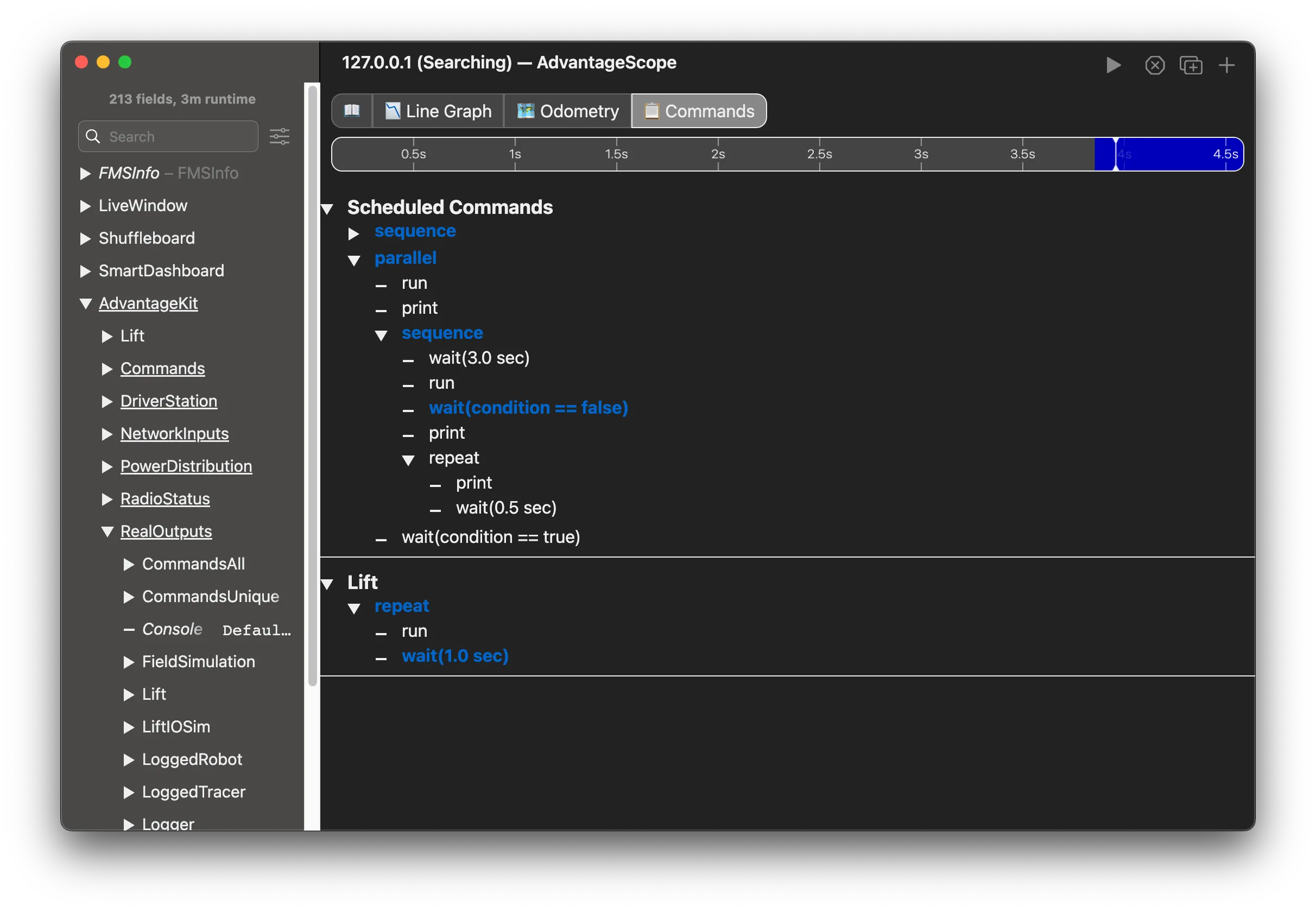
The fork is mine; I haven’t opened a pull request for it upstream.
Autos as scripts
An FRC match starts with a 15-second autonomous period, and teams keep a handful of autos to pick from before each match. Once commands read like a script, it made sense to make autos actual scripts. At startup, the robot loads every *.auto.kts file in its deploy directory with the Kotlin scripting host. Each script runs against an AutoScope, which is the same builder plus a name, a group, timeLeft, and path-following helpers, with the robot itself available as robot:
name = "TestAuto"
group = "Test"

print { "Hello, world!" }
+Lift.it.l1

repeat(5) {
  wait(1.0)
  print { "Repeating this 5 times!" }
}

+robot.lift.intake

print { "All done!" }
The compilation setup is short, because the scripting host can hand the script the robot’s whole classpath:
compilationConfiguration =
  createJvmCompilationConfigurationFromTemplate<AutoScript> {
    jvm { dependenciesFromCurrentContext(wholeClasspath = true) }
    implicitReceivers(AutoScope::class)
    providedProperties("robot" to RobotShell.robot::class)
    defaultImports(*defaultImports.toTypedArray())
  }
Compiling and evaluating returns either a built command or diagnostics, so an auto with a typo is reported and skipped instead of crashing the robot program at startup.
The part I was most excited about is redeploying autos to a running robot. A small Python script compares each local .auto.kts with the source the robot last loaded and pushes any that changed over NetworkTables, the robot’s key-value network bus. The robot compiles the new source, swaps it into the auto chooser, and sends the compiler’s diagnostics back to the laptop:
====== Test.auto.kts ======
  Deployed successfully
  Diagnostics for Test.auto.kts:
  Successfully compiled.
  Successfully evaluated.
  Successfully built auto command.
This matters because of how autos get built today. An auto drawn in a path-planning tool is just a file, so it can be redeployed reliably. An auto built mostly in code can’t, because changing it means rebuilding and restarting the whole robot program. A .kts auto is just a file too, so it can be hot-deployed and run safely without disturbing the rest of the system, and it still has the full power of the robot code behind it. It’s the feature I most want to see at an event.
Testing against the real scheduler
Writing robot code in Kotlin let me test it with Kotest, and that turned out to be one of the coolest parts of the project. The tests don’t mock WPILib. They build a command with the DSL, schedule it, run the real CommandScheduler in a loop, and check what has happened at each point in time:
"sequence test" {
  var i: Int? = null
  var j: Int? = null
  var k: Int? = null

  val cmd = sequence {
    run { i = 1 }
    wait(0.5)
    run { j = 1 }
    wait(0.5)
    run { k = 1 }
  }

  cmd()  // `invoke` is overloaded to schedule a command
  scheduler.run()

  withClue("i should be set") {
    i shouldBe 1
    j shouldBe null
    k shouldBe null
  }

  continually(cmdConfig(0.5.seconds)) { scheduler.run() }

  withClue("i and j should be set") {
    i shouldBe 1
    j shouldBe 1
    k shouldBe null
  }
  // ...
}
Testing also turned up a WPILib quirk: SequentialCommandGroup.isFinished() still returns false after the group has ended, because end() resets its index to -1 and isFinished() only checks for the end of the list. I opened a fix upstream, and the maintainers declined it for a fair reason: isFinished() is only defined between initialize() and end(), and calling it outside that window is undefined behavior. My tests read the group’s index through reflection instead.
Full-robot simulation tests
The same approach works one level up. Instead of testing a single command, a test boots the whole robot in simulation, enables it the way the Driver Station would, and runs real routines against simulated hardware. Every subsystem sits behind an IO interface, so the simulated robot runs exactly the same subsystem and command code as the real one; only the bottom layer is swapped for a simulated implementation like LiftIOSim.
The harness is small. WPILib’s hardware abstraction layer can run without a robot controller, SimHooks lets the test pause the clock and advance it one 20 ms loop at a time, and DriverStationSim plays the part of the Driver Station:
class SimRobot<T : RobotShell>(create: () -> T) {
  val robot: T

  init {
    HAL.initialize(500, 0)
    SimHooks.pauseTiming()  // the test owns the clock
    robot = create()
    robot.robotInit()
  }

  fun enable(mode: Mode) {
    DriverStationSim.setAutonomous(mode == Mode.Auto)
    DriverStationSim.setEnabled(true)
    DriverStationSim.notifyNewData()
  }

  /** Advance one robot loop: sim physics, then subsystems and commands. */
  fun step() {
    SimHooks.stepTiming(0.02)
    robot.simulationPeriodic()
    robot.robotPeriodic()
    CommandScheduler.getInstance().run()
  }

  /** Step until [done] is true, or fail the test after [timeout] of robot time. */
  fun runUntil(timeout: Duration, done: () -> Boolean) {
    repeat((timeout.inWholeMilliseconds / 20).toInt()) {
      step()
      if (done()) return
    }
    fail("condition not met within $timeout of robot time")
  }
}
Because time only moves when the test says so, a 15-second auto runs in a fraction of that and gives the same result every time. The tests read like a description of what the robot should do, including when something goes wrong:
class LiftSimTest : StringSpec({
  lateinit var sim: SimRobot<Moonwake>

  beforeEach { sim = SimRobot(::Moonwake) }
  afterEach { CommandScheduler.getInstance().cancelAll() }

  "lift reaches L4 and holds it" {
    sim.enable(Mode.Teleop)
    Lift.it.l4()

    sim.runUntil(timeout = 3.seconds) { Lift.State.isAtGoal() }
    Lift.it.height shouldBe (Level.L4.height plusOrMinus 0.5 * Inch)
  }

  "homing gives up safely if the lower limit switch never trips" {
    LiftIOSim.faults.lowerLimitStuckOpen = true
    sim.enable(Mode.Teleop)

    val home = Lift.it.home  // sequence { ...; wait(lowerLimitHit); ... } timeout 2.0
    home()

    sim.runUntil(timeout = 3.seconds) { !home.isRunning() }
    Lift.State.lowerLimitHit.asBoolean shouldBe false
    Lift.it.inputs.leadWinch.appliedVoltage shouldBe (0.0 * Volts)
  }

  "test auto finishes inside the 15 second period" {
    AutoRegistry.select("Test/TestAuto")
    sim.enable(Mode.Auto)

    val auto = sim.robot.autoCommand
    sim.runUntil(timeout = 15.seconds) { !auto.isRunning() }
  }
})
The failure cases are the ones I care about most. A real robot can’t tell you that homing would have driven the elevator into its hard stop if a limit switch came unplugged. A test can, every time someone changes the code, before the robot is ever turned on. And because the tests run in CI, a student gets that answer on their pull request instead of from a mentor at the practice field.
The rest of the library
Commands were the first thing I built, but they’re not the only place Java makes robot code more work than it should be. The same testbed has five other pieces. For each one I’ll compare it against our 2025 competition code in Java, since that’s the baseline we actually ship.
Units
WPILib’s units library is a good idea. A Distance can’t be passed where an Angle is expected, and a robot that mixes up inches and meters is a robot that breaks something. The trouble in Java is that arithmetic across units is awkward, so the code drops out of the type system as soon as it does math. Our elevator converts between winch rotation and lift height like this:
private Angle inchesToRadians(Distance d) {
  return Radians.of(d.minus(MIN_HEIGHT).in(Meters) / DRUM_RADIUS.in(Meters));
}

private Distance radiansToInches(Angle a) {
  double d = a.in(Radians) * DRUM_RADIUS.in(Meters);
  return Meters.of(d).plus(MIN_HEIGHT);
}
Each .in(Meters) turns a measure into a bare double, and from there it’s on you to remember what the number means. The same two conversions in Kotlin:
private fun liftHeightToWinchAngle(height: Distance): Angle =
  ((height - LiftConstants.MIN_HEIGHT) / LiftConstants.DRUM_RADIUS) * Radians

private fun winchAngleToLiftHeight(winchPosition: Angle): Distance =
  (winchPosition valueIn rad) * LiftConstants.DRUM_RADIUS + LiftConstants.MIN_HEIGHT
A number times a unit makes a measure, so the level heights read 19.9 * Inch instead of Inches.of(16.4 + 3.5). Measures work with +, - and /, and dividing a distance by a distance gives a plain ratio, which * Radians labels as an angle. When you do need a bare number, valueIn asks for it in a specific unit, and Inches to Meters gives you the conversion factor. Short names like sec, rad, deg, ft and mps cover the units we use most.
This isn’t a new units library. It’s one file of extension functions over WPILib’s own types, so everything that takes a WPILib measure still takes these.
Logging inputs and outputs
AdvantageKit logging shows up in two places in our code. The first is hardware inputs. Each subsystem has an IO interface with an inputs class, and every motor on it needs the same handful of fields:
@AutoLog
public static class ElevatorIOInputs {
  public boolean lowerLimit = false;
  public boolean winchConnected = false;
  public Angle winchPosition = Radians.of(0.0);
  public AngularVelocity winchVelocity = RadiansPerSecond.of(0.0);
  public Voltage winchAppliedVolts = Volts.of(0.0);
  public Current winchCurrent = Amps.of(0.0);
}
Then the real IO class copies them over one by one, and the simulated one does it again. In Kotlin, the per-motor fields are one class, and it already knows how to fill itself from a TalonFX:
@AutoLog
open class LiftIOInputs {
  var lowerLimit = false
  var leadWinch = MotorInputs()
  var followerWinch = MotorInputs()
}

// in the TalonFX IO class
inputs.leadWinch = leadTalon.motorInputs
AdvantageKit’s @AutoLog is Java-only: it generates the logging class with a Java annotation processor, which doesn’t run on Kotlin code. So I wrote a KSP processor that generates the same LiftIOInputsAutoLogged class, and it also flattens nested classes like MotorInputs so their fields still show up as individual log keys.
The second place is outputs, things like poses, mechanism state, and whether a limit switch is hit. Java has @AutoLogOutput. I added @Log, which goes on any property or function:
object State {
  @Log(key = "Lift/Level") val desiredLevel = Level.MinHeight
  @Log val lowerLimitHit = Trigger { Lift.it.inputs.lowerLimit }
}
When the robot starts, the shell walks the robot’s object graph with reflection and registers every @Log member to be logged each cycle. @Log is how AdvantageKit output logging works for Kotlin, and because I own the processing, it supports more types than the built-in annotation does. Types it doesn’t know can be added with one function, and PIDController and ProfiledPIDController are already handled, so a controller logs its setpoint, its error, and whether it’s at the setpoint.
Tunables
Tuning a robot means changing a number, deploying, and trying again, and that gets old fast. So we publish the numbers we tune to NetworkTables and change them live. In Java, every tunable is a wrapper object, a hand-typed key, and a listener that pushes the new value to wherever it’s used. Three of our elevator gains and the listener for one of them:
public static final LoggedTunableNumber kP = new LoggedTunableNumber("Tuning/Elevator/kP", 6.0);
public static final LoggedTunableNumber kI = new LoggedTunableNumber("Tuning/Elevator/kI", 0.2);
public static final LoggedTunableNumber kD = new LoggedTunableNumber("Tuning/Elevator/kD", 0.1);

// in the TalonFX IO class, one of these per gain, seven in all
Real.kP.addListener(kP -> {
  currentPids.kP = kP;
  lead.getConfigurator().apply(currentPids);
});
In Kotlin, it’s an annotation on the constant:
object LiftConstants {
  @Tunable val GEARING = 5.0
  @Tunable val MIN_HEIGHT = Inches.of(16.4)
  @Tunable val CARRIAGE_MASS = Pounds.of(24.0)
}
A processor generates a tunableGearing property that always returns the latest value, an onGearingChange { } function to run code when it changes, and the NetworkTables key from where the constant lives. It works on doubles, strings, booleans, any WPILib measure, and PIDControllers, where a single annotation publishes and applies all the gains.
Tunables are for the pit and practice field, not for matches. In an official match, code that reads a tunable starts from the default written in the source, not whatever value was last left in NetworkTables, so a number someone tweaked at practice can’t leak into a match.
The TalonFX gains are still a hand-written listener. Annotating a motor controller directly is on the roadmap.
Subsystems as singletons
In our Java robot, the subsystems are built in one place and handed to whoever needs them. The 2025 RobotContainer is 360 lines. It builds each subsystem for the current mode, and passes references along, like giving drive to Vision. That works, until simulation. Simulating a subsystem often needs to reach into another one, and this year that pushed us into patterns that break the isolation between them. The design doc for the Kotlin version starts from the opposite rule: every subsystem is a singleton you can reach from anywhere.
@Singleton
class Lift internal constructor(private val io: LiftIO) : SubsystemBase() {
  companion object {}
}
The annotation generates two functions on the companion. Lift.create(io) builds the subsystem and throws if you call it twice, and Lift.it returns it, throwing if it doesn’t exist yet. That means an auto, a sim, or another subsystem can use Lift.it.l4 without anyone wiring it through a constructor.
Here is the difference in practice. In Java, anything that needs the lift has to be handed one:
// RobotContainer.java
Elevator elevator = new Elevator(elevatorIO);
Vision vision = new Vision(drive, visionIO);   // drive passed along by hand
Every new dependency means editing the container and every constructor between it and the code that needs it. In Kotlin, the same code just asks:
+Lift.it.l4 // from an auto script, a sim, or another subsystemThe wiring moves out of the call sites. It happens once, when the robot starts and each subsystem’s create runs.
It’s a real trade-off. Global access removes a lot of plumbing, but it’s also global state, and a mistake in construction order turns into a crash at startup instead of a compile error. I think it’s worth it for a robot, where there’s one of each subsystem anyway, but I haven’t run it on a full robot yet.
No main, no shell
A new Java robot project starts with a Main class that says not to touch it, and a Robot class of about 270 lines. Ours sets up logging and build metadata, decides whether it’s running on the real robot, in simulation, or replaying a log, finds which robot it’s on by its MAC address, and forwards every lifecycle callback (autonomousInit, teleopPeriodic, and so on) to a RobotContainer. That has its own base class with eleven empty hooks. It’s all necessary, and none of it is the robot.
In Kotlin, that all lives in the library. RobotShell owns the lifecycle, sets up AdvantageKit for real, simulated, and replayed runs, records the git commit and build date, and picks the robot to run from the MAC address. The whole of Main is one call, and it never changes:
RobotBase.startRobot(RobotShell::robot)A robot is a class that says what’s unique about it:
class Moonwake : RobotShell("Moonwake") {
  val lift: Lift

  init {
    when (Constants.robotType) {
      RobotType.Real -> lift = Lift.create(LiftIOTalonFX())
      RobotType.Sim -> lift = Lift.create(LiftIOSim())
      RobotType.Replay -> lift = Lift.create(LiftIONull())
    }
  }

  override val autoCommand: Command
    get() = AutoRegistry.get()

  override val testCommand: Command
    get() = Commands.none()
}
Adding a robot means writing another class like this and one line that maps its MAC address to it. A student never has to open Main or Robot, and doesn’t need to know they exist.
The alternative: WPILib commands v3
WPILib is tackling the same readability problem from a different direction. Commands v3, in alpha for the 2027 season as of September 2026, lets you write a command as one imperative function. The function gets a Coroutine and calls coroutine.yield() to hand control back to the scheduler each loop:
Command command = Command.noRequirements(coroutine -> {
  initialize();
  while (!isFinished()) {
    execute();
    coroutine.yield();
  }
  end();
}).named("MyCommand");
That’s a real improvement for exactly the student I’m worried about: code that reads top to bottom, with loops and ifs that work the way they already know. It also adds command priorities and makes names mandatory.
It has costs too. It’s built on jdk.internal.vm.Continuation, an internal JDK API (the one behind virtual threads) that has to be opened up with JVM flags. It needs Java 21, so it’s for the new control system and not the roboRIO. It’s designed for a single-threaded program. And it’s a new framework rather than a layer over the one teams already know, so existing command code and habits don’t carry over directly.
I didn’t reach for Kotlin’s own coroutines either. The hardware layer underneath robot code isn’t somewhere I’d want to introduce asynchronous code, and the DSL gets most of the readability without changing how anything runs.
So the two make opposite trades. The DSL changes nothing about how commands run, so it works on WPILib’s existing framework today, but underneath it’s still declarative composition: you describe the whole tree up front. v3 lets you write behavior as it unfolds over time, at the cost of a new runtime model.
Porting the DSL onto v3 could remove some of its hackiness, such as the reflection used for the command tree, and improve performance. It isn’t planned right now.
Conclusion
Like JSX, this DSL doesn’t add any new capabilities. Every block becomes an ordinary WPILib command, run by the same scheduler teams already trust. What changes is how much a student has to hold in their head to read and write one, because the shape of the code is the shape of the behavior.
Building it also taught me where the cost of a nice syntax actually lives. It isn’t in the builders, which are a handful of short functions. It’s at the edges: infix functions that have to undo work Kotlin already did, names that collide with the standard library, a + that fails silently, and tooling like logging that has to understand the new structure, or else the DSL just hides problems better. Once those were handled, the same foundation carried further than I expected, into per-block timers, autos that can be redeployed to a running robot, and tests that run the whole robot in simulation.
None of this has been to a competition yet. The switch to Kotlin is waiting on the move off the roboRIO, and that’s the right call: new hardware is enough change for one season. But the goal hasn’t changed. I want a new student’s first week with command-based programming to be about the robot, not Java’s syntax, and I want the students who stick around to write code the next group can read.