pywire
An open-source Python web framework for interactive, server-rendered apps, with its own compiler, language server, and editor tooling. Live at pywire.dev
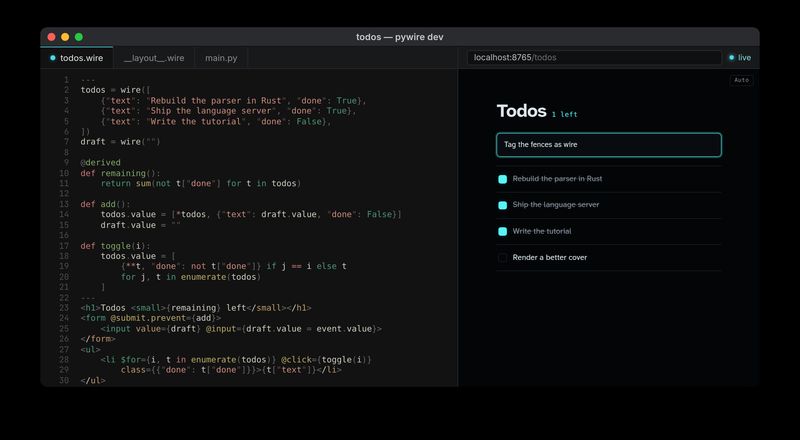
Table of Contents
pywire is a Python web framework for building interactive web apps without writing client-side JavaScript. You write single-file .wire components, with Python on top and HTML below. The server renders the page, and when state changes it sends the browser patches for just the parts of the page that changed.
I started it in January 2026, and I design and maintain it myself. It’s now about 600 commits across a dozen packages: the framework, a compiler, a language server, a VS Code extension, a formatter, an auth package, a scaffolder, and a docs site whose tutorial runs entirely in your browser. It’s open source (Apache 2.0) and pre-1.0.
Try it with uvx create-pywire-app, read the docs at pywire.dev, or browse the source at github.com/pywire.
Technologies Used:
- Python and Starlette
- tree-sitter
- TypeScript and morphdom
- Language Server Protocol with pygls and Ty
- Pyodide
- release-please
The Problem
A Python developer who wants an interactive web page usually ends up building two applications. The back end is Python. The front end is a JavaScript framework with its own state and build tooling, and a JSON API in between that someone has to design, version, and keep in sync. Sharing models across two languages adds steps and churn, and code generation trades flexibility for speed. For internal tools, dashboards, and CRUD apps, that split is most of the work.
Server-driven UI avoids the split. The server owns the state, the browser sends events, and the server sends back HTML. Phoenix LiveView, Laravel Livewire, and Blazor Server showed how productive that model can be. I’d used React, Svelte, Vue, Blazor, Alpine.js, and htmx, and the server-driven options felt right at first but got harder as apps grew. htmx takes real discipline to keep readable in large features. Blazor starts off great, but in my experience its performance and its handling of ordinary auth and middleware get in the way in real apps.
Python has a great ecosystem for building server APIs quickly, and nothing equivalent for building a whole interactive app. I wanted the server-first model in Python, with the authoring experience I like most on the front end: Svelte’s single-file components, HTML that looks like HTML, and reactivity that just works. I also think server-first will get more popular as networks get faster and edge deployment gets more practical, because it keeps the mental model and the security model simple.
Where It Started
pywire is my third attempt at this idea. In August 2025 I built two prototypes in Kotlin, because Kotlin’s developer experience is excellent: trailing lambdas make clean DSLs, coroutines make async code pleasant, and the JVM brings all of Java’s libraries.
The first prototype took four days and ran entirely on the server. Components were Kotlin functions on Ktor that rendered HTML through a type-safe DSL and kept state in the user’s session. A small TypeScript runtime forwarded clicks, inputs, and form submissions over a WebSocket, and the server re-rendered the component and sent back its HTML. By the fourth day, a todo app worked.
The second, Kascade, went the other way. It was React-inspired and built on Kotlin Multiplatform, so the same component code compiled for the server and the browser, and an action could run on either side with RPC between them. In six days it had layouts, client-side routing, typed routes, and nested components.
val CounterComponent = component<CounterComponentProps> {
    var count by state(props.start)

    body {
        div { +"$count" }
        button {
            onClick { count += props.step }
            +"Increment"
        }
    }
}
Kascade stalled on complexity. Kotlin Multiplatform was still immature, and a codebase where every line targets both the server and the client, with no finer control over what runs where, gets hard to manage fast. Kotlin’s reach was the other problem: a Kotlin web framework is a hard sell outside the Kotlin community. Python is far more popular for building APIs and more relevant for AI-native development, so that’s where I went next.
Three things carried over. pywire went back to the first prototype’s model, where everything runs on the server. It kept morphdom, which I’d switched Kascade to from snabbdom. And it dropped the HTML DSL. Editor tooling like Tailwind’s extension, Emmet, and formatters is built around real HTML, and AI models write good HTML but not good HTML DSLs. Real HTML keeps all of that working.
The Plan
A few decisions shaped everything else:
- One file per component. A
.wirefile holds the Python and real HTML together, like a Svelte or Astro component. Styles can be scoped to it. - Explicit reactivity. Ordinary Python variables stay ordinary. Only values wrapped in
wire()are reactive, so there’s no magic around which assignments trigger a re-render. - Compile, don’t interpret. Each
.wirefile compiles to a normal Python class, so type checkers, debuggers, and tracebacks all work on the Python block. - Tooling from day one. A new file format is only pleasant with syntax highlighting, completions, and error squiggles. The first commit included a language server and a VS Code extension.
- The transport shouldn’t matter. A page should behave the same whether it arrives over HTTP or over the WebSocket, including middleware and auth.
How It Works
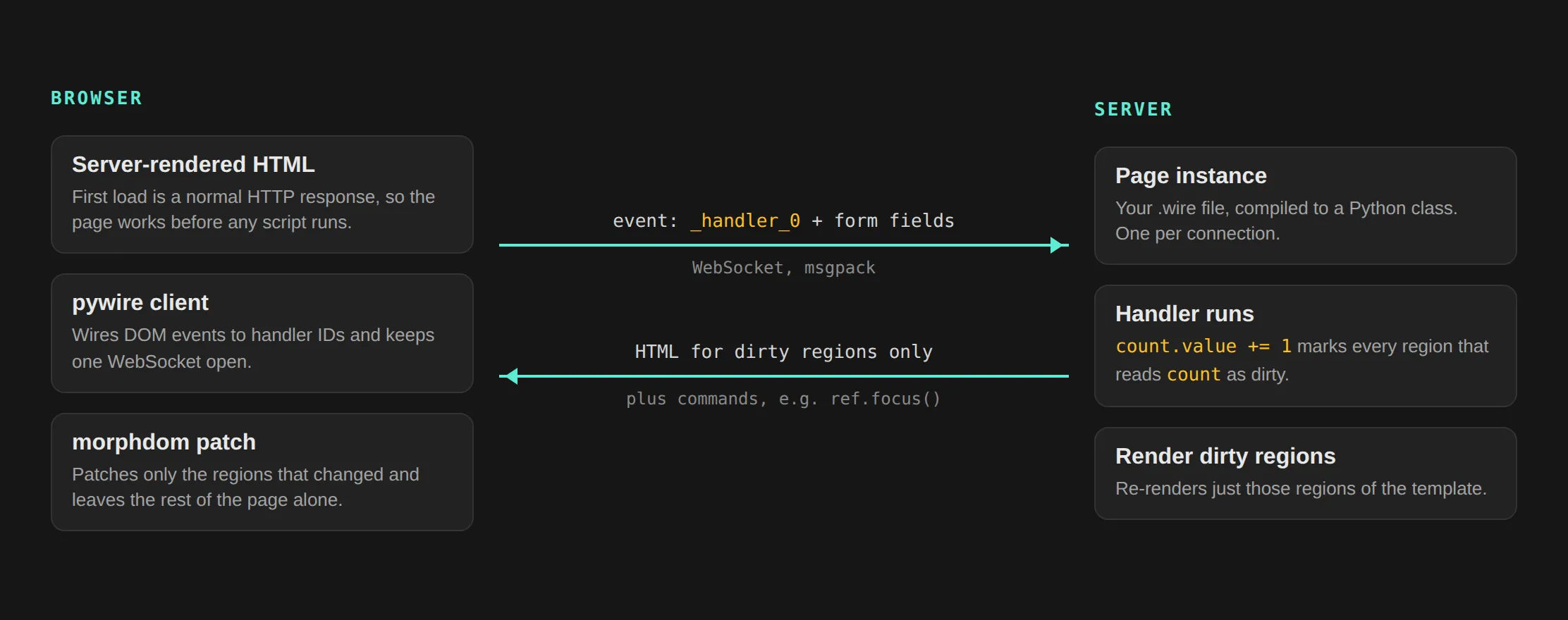
The first request is plain HTTP, so every page is real HTML before any script runs. After that, the client opens one WebSocket. Clicking a button sends the handler’s ID and any form fields. The server runs the handler on that connection’s page instance, works out which template regions read the wires that changed, re-renders just those regions, and sends their HTML back. The client patches them into the DOM with morphdom.
Implementation
The .wire Format
Here’s the todo app from the cover:
---
todos = wire([
    {"text": "Rebuild the parser in Rust", "done": True},
    {"text": "Ship the language server", "done": True},
    {"text": "Write the tutorial", "done": False},
])
draft = wire("")

@derived
def remaining():
    return sum(not t["done"] for t in todos)

def add():
    todos.value = [*todos, {"text": draft.value, "done": False}]
    draft.value = ""

def toggle(i):
    todos.value = [
        {**t, "done": not t["done"]} if j == i else t
        for j, t in enumerate(todos)
    ]
---
<h1>Todos <small>{remaining} left</small></h1>
<form @submit.prevent={add}>
    <input value={draft} @input={draft.value = event.value}>
</form>
<ul>
    <li $for={i, t in enumerate(todos)} @click={toggle(i)}
        class={{"done": t["done"]}}>{t["text"]}</li>
</ul>
Everything above the second --- is Python. Below it, {...} interpolates any Python expression, @click and @submit.prevent bind events to Python handlers, and $for repeats an element. Directives above the Python block, like !path "/todos" or !layout "...", set routing and layout. Pages live in src/pages/, and the file path becomes the URL unless a !path overrides it.
Components are just .wire files you import with normal Python imports. Their props are a typed class:
---
from pywire import props

@props
class Props:
    name: str
    greeting: str = "Hello"
---
<h2>{props.greeting}, {props.name}!</h2>
Markup passed between a component’s tags arrives as children, and a component renders it with {$render children}. Named snippets fill other regions, which is also how layouts work.
The Compiler
The parser went through three versions:
- A hand-written HTML parser, which lasted a day.
- lxml, which was fine until the syntax grew. A
.wirefile mixes Python, HTML, CSS, and JavaScript, with Python expressions inside attributes and text, and every tool needs to agree on where one language ends and the next begins. - A tree-sitter grammar, which became the single source of truth for the language. The compiler, the language server, the syntax highlighter, and the formatter all read the same grammar, so they can’t disagree.
The tree-sitter parser was first built in Rust. It was fast, but it had to be compiled for every platform and again for WebAssembly, mostly so the interactive tutorial could run it in the browser. In hindsight that was premature optimization: I optimized for speed and portability before deciding what the framework actually needed. Two months later I replaced it with a pure-Python package on the same grammar. It installs everywhere without platform-specific wheels, and it’s what lets pywire run in Pyodide and on Cloudflare’s Python Workers.
The compiler turns each .wire file into a Python class, with a source map back to the original file. When something fails, the traceback points at the right line of your .wire file, and in development, print() output and errors from event handlers appear in your browser’s console.
Reactivity
Reactivity took five designs to get right. It started as plain top-level variables that the compiler moved onto the page object. Then came an explicit wire() primitive with a $count shorthand, then wire, derived, and effect without the shorthand, then Svelte-style stores on top. Finally I removed the stores, because they felt foreign next to wire and derived and mostly duplicated what they already did. What’s left is wire, derived, and producer.
I miss the $ shorthand. It was one of the most recognizable parts of pywire’s syntax, but it made the grammar ambiguous. Writing .value to reassign a wire is clear enough, and it makes every state change easy to spot.
Wires unwrap automatically in templates, comparisons, iteration, and len(), so you only write .value when you reassign one. Writing to a wire marks every template region that reads it as dirty, and only dirty regions are re-rendered and sent.
All of that churn was on purpose. The project’s contributor guide says it directly: “The project has few users. Prefer clean breaks over compatibility.” Pre-1.0 is the cheapest time to fix an API.
One Rule for Both Transports
pywire pages load over HTTP, but moving between pages happens over the WebSocket, like a single-page app. For a while that had a serious gap: navigating over the WebSocket skipped the ASGI middleware stack, so auth, rate limiting, and CORS didn’t run when a user clicked a link.
The fix runs every WebSocket navigation through the middleware stack as an internal request, and it became a design rule: middleware, auth, and sessions behave identically over HTTP and over the WebSocket, and app developers never handle the two differently. pywire-auth follows it. It provides OAuth2/OIDC sign-in with Google, GitHub, Microsoft, and others, plus a local identity provider, and its policies work the same on both paths and fail closed.
The same thinking goes into deployment:
- Several workers: a Redis session store lets pywire run across workers. It used to require a single worker because session state lived in memory.
- No WebSockets: an HTTP-only mode serves apps where persistent WebSockets aren’t possible.
- Existing apps: pywire can be mounted inside a FastAPI or Starlette app.
- Hosting: the scaffolder can generate deploy configs for Docker, Render, Fly, Railway, and Cloudflare.
Editor Tooling
The tooling is half the project:
- Language server: it transpiles
.wirefiles to Python with a source map and runs Ty on the result. That gives completions, hover, go-to-definition, and type errors inside.wirefiles. - VS Code extension: highlighting comes from pywire’s TextMate grammar (this site uses the same grammar for its code blocks). The extension installs the language server into a managed environment, so server updates ship without a new extension release.
- Prettier plugin: formats
.wirefiles, deferring to your existing HTML and Python formatting rules. pywire check: static analysis for mistakes the type checker can’t see.
The language server started on jedi, then moved to Pyright, then to Ty. I bet on Ty early because speed matters most in an editor. On a big project, a slow language server leaves you working blind while it catches up. Astral had already proven itself with uv, and Ty was far faster than the alternatives.
Learning It in the Browser
The interactive tutorial has 34 steps, and each one runs pywire itself in your browser with Pyodide. There’s nothing to install. The server and the client both run in the page, with a shim in place of the WebSocket between them. Getting that right meant fixing stale connections, orphaned app instances, and heartbeat timers that outlived their iframes.
Shipping It
pywire started as several repositories. In April 2026 I merged them into one monorepo, keeping their history, and set up release-please to version and publish each package on its own:
- Python packages go to PyPI.
- The VS Code extension goes to the Marketplace and Open VSX.
- An
npx create-pywire-applauncher goes to npm.
The core package has had 31 releases since then. Packages depend on each other, so a language server release is only safe once the pywire version it needs is published. The repo derives its dependency graph from the package manifests and blocks a release until everything it depends on is out. The test suite has more than a thousand tests and runs on Python 3.11 through 3.14.
Working With AI Agents
I build pywire with AI coding agents, and the split of work is deliberate. I decide the features, the developer experience, the interfaces, and the design patterns, and I keep the project aligned with its mission: a simple mental model and the best DX I can manage. The agents deliver pieces of those features iteratively, test first. The instructions live in the repo as an AGENTS.md, so the same setup works in Claude Code, Codex, Cursor, and other agents, and design specs are written and reviewed before implementation starts.
Where It Stands
pywire is at version 0.15, and the API will tighten before 1.0. Work in progress includes CSRF protection, observability, a test client, more pywire check rules, and more ways to deploy.
Further out, I want to take the same model to the desktop. I prototyped pywire-shell, which ran pywire apps as lightweight desktop apps on the Servo browser engine. The goal is an alternative to Electron and React Native where you write only the server side and pywire handles the front end, with a simpler local security model than Electron or Tauri. It’s parked for now so I can focus on the core.
If you try pywire, I’d love to hear what you build.